Python 助你快速上手 Apache APISIX 插件开发
在 Apache APISIX Python Runner 之前社区中已经支持了 Java
和 Go 语言的 Runner ,今天 Python Runner
也来了,社区中的小伙伴们在开发 Apache APISIX 的插件时又多了一种新选择。
简介#
Apache APISIX#
Apache APISIX 是一个高性能的云原生开源 API 网关,它可以对请求进行统一的拦截和治理(如:鉴权、认证、缓存、版本、熔断、审计 等等)帮助开发人员轻松的对外提供安全可靠的服务,而开发人员通过 Apache APISIX
的加持只需要关注业务实现即可,省去了大量花费在通用能力上的开发与维护上的时间并且也降低了整体业务架构的复杂度。
Python#
Python 语言作为一个解释型的高级编程语言,它 语法简洁易上手、代码可读性好 ,在 跨平台 、可移植性 、开发效率
上都有很好的表现,同时作为一个高级编程语言它的封装抽象程度比较高屏蔽了很多底层细节(例如:GC
)让我们在开发的过程中可以更专注应用逻辑的开发。Python 作为一个有30年历史的老牌开发语言,它的生态以及各种模块已经非常完善,我们大部分的开发和应用场景都可以从社区中找到很成熟的模块或解决方案。Python
其他的优点就不再一一赘述。Python 的缺点也比较明显:Python 作为一门解释性语言,相较于 C++ 和 Go 这样的编译型语言,在性能上的差距还是比较大的。
Apache APISIX Python Runner#
apache-apisix-python-runner 这个项目可以理解为 Apache APISIX
和 Python
之间的一道桥梁,通过 Python Runner 可以把 Python 直接应用到 APISIX 的插件开发中,最重要的还是希望让更多对 Apache APISIX 和 API 网关 感兴趣的 Python开发者
通过这个项目更多的了解使用 Apache APISIX,以下为 Apache APISIX 多语言支持的架构图。
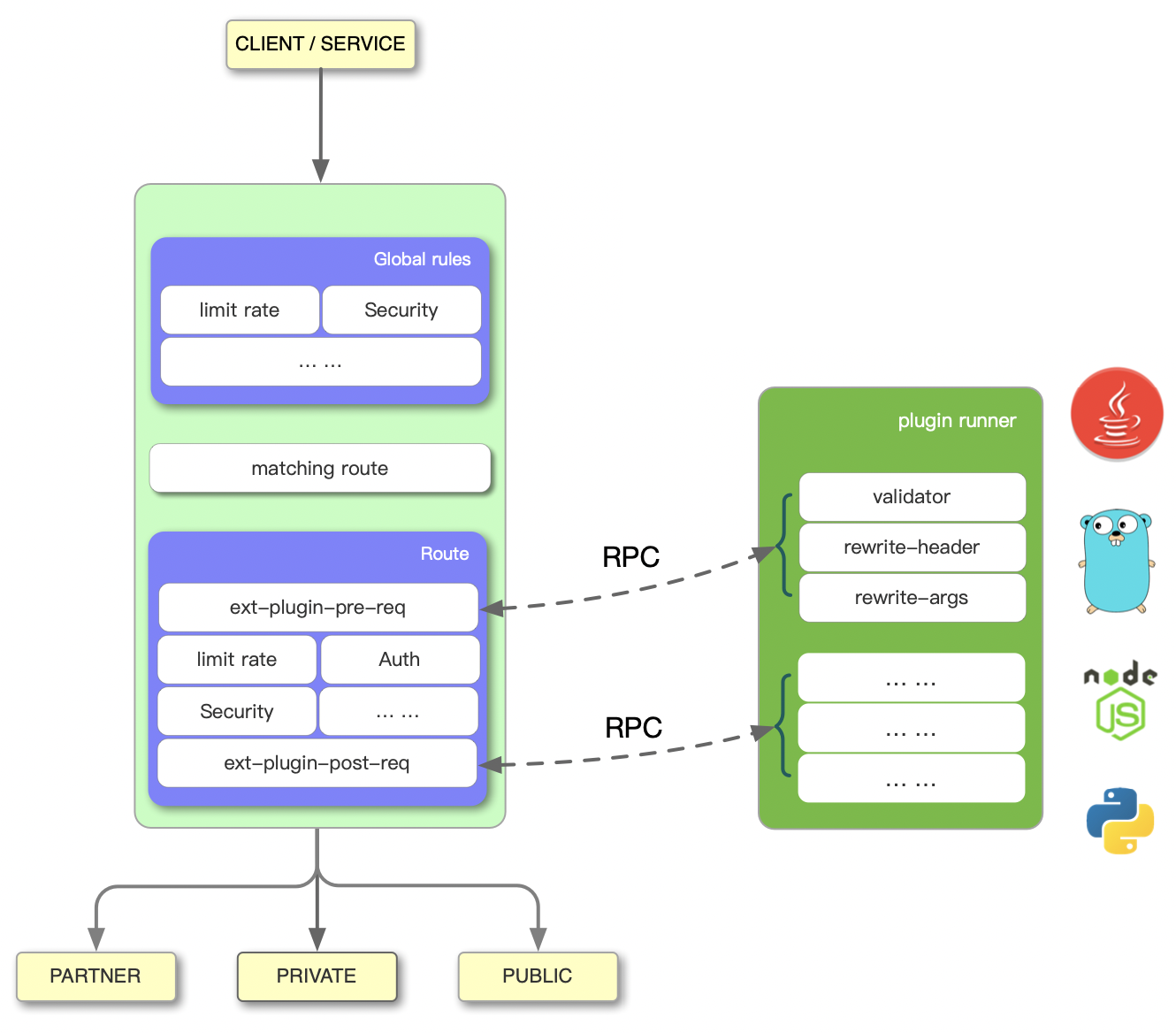
上图左边是 Apache APISIX 的工作流程,右边的 Plugin Runner 是各语言的插件运行器,本文介绍的 apisix-python-plugin-runner 就是支持 Python
语言的 Plugin Runner。
当你在 Apache APISIX 中配置一个 Plugin Runner 时,Apache APISIX 会启动一个子进程运行 Plugin Runner,该子进程与 Apache APISIX
进程属于同一个用户,当我们重启或重新加载 Apache APISIX 时,Plugin Runner 也将被重启。
如果你为一个给定的路由配置了 ext-plugin-* 插件,请求命中该路由时将触发 Apache APISIX 通过 Unix Socket 向 Plugin Runner 发起 RPC 调用。调用分为两个阶段:
- ext-plugin-pre-req
:在执行
Apache APISIX内置插件(Lua 语言插件)之前 - ext-plugin-post-req
:在执行
Apache APISIX内置插件(Lua 语言插件)之后
大家可以根据需要选择并配置 Plugin Runner 的执行时机。
Plugin Runner 会处理 RPC 调用,在其内部创建一个模拟请求,然后运行多语言编写的插件,并将结果返回给 Apache APISIX。
多语言插件的执行顺序是在 ext-plugin-* 插件配置项中定义的,像其他插件一样,它们可以被启用并在运行中重新定义。
部署测试#
基础运行环境#
- Apache APISIX 2.7
- Python 3.6+
Apache APISIX
的安装部署本文不在过多赘述,详情请参考 Apache APISIX 官方文档:如何构建 Apache APISIX
进行部署。
下载安装 Python Runner#
$ git clone https://github.com/apache/apisix-python-plugin-runner.git$ cd apisix-python-plugin-runner$ make install配置 Python Runner#
开发模式#
运行Python Runner#
$ cd /path/to/apisix-python-plugin-runner$ APISIX_LISTEN_ADDRESS=unix:/tmp/runner.sock python3 apisix/main.py start修改APISIX配置文件#
$ vim /path/to/apisix/conf/config.yamlapisix: admin_key: - name: "admin" key: edd1c9f034335f136f87ad84b625c8f1 role: adminext-plugin: path_for_test: /tmp/runner.sock生产模式#
修改APISIX配置文件#
$ vim /path/to/apisix/conf/config.yamlapisix: admin_key: - name: "admin" key: edd1c9f034335f136f87ad84b625c8f1 role: adminext-plugin: cmd: [ "python3", "/path/to/apisix-python-plugin-runner/apisix/main.py", "start" ]Python Runner配置(可选)#
如果需要对 Log Level 或 Unix Domain Socket 环境变量调整可以修改 Runner 的配置文件
$ vim /path/to/apisix-python-plugin-runner/apisix/config.yamlsocket:  file: $env.APISIX_LISTEN_ADDRESS # Environment variable or absolute path
logging: level: debug # error warn info debug启动 Python Runner#
$ cd /path/to/apisix# Start or Restart$ ./bin/apisix [ start | restart ]启动或重启 APISIX 即可,此时 APISIX 和 Python Runner 已经完成配置并启动。
测试 Python Runner#
配置 Apache APISIX 路由及插件信息#
# 使用默认demo插件进行测试$ curl http://127.0.0.1:9080/apisix/admin/routes/1 -H 'X-API-KEY: edd1c9f034335f136f87ad84b625c8f1' -X PUT -d '{ "uri": "/get", "plugins": { "ext-plugin-pre-req": { "conf": [ { "name": "stop", "value":"{\"body\":\"hello\"}"} ] } }, "upstream": { "type": "roundrobin", "nodes": { "127.0.0.1:1980": 1 } }}'plugins.ext-plugin-pre-req.conf为Runner插件配置,conf为数组格式可以同时设置多个插件。- 插件配置对象中
name为插件名称,该名称需要与插件代码文件和对象名称一直。 - 插件配置对象中
value为插件配置,可以为JSON字符串。
访问验证#
$ curl http://127.0.0.1:9080/get -iHTTP/1.1 200 OKDate: Fri, 13 Aug 2021 13:39:18 GMTContent-Type: text/plain; charset=utf-8Transfer-Encoding: chunkedConnection: keep-alivehost: 127.0.0.1:9080accept: */*user-agent: curl/7.64.1X-Resp-A6-Runner: PythonServer: APISIX/2.7
Hello, Python Runner of APISIX插件开发#
插件目录#
/path/to/apisix-python-plugin-runner/apisix/plugins此目录中的 .py 文件将会被自动加载。
插件示例#
/path/to/apisix-python-plugin-runner/apisix/plugins/stop.py/path/to/apisix-python-plugin-runner/apisix/plugins/rewrite.py插件格式#
from apisix.runner.plugin.base import Basefrom apisix.runner.http.request import Requestfrom apisix.runner.http.response import Response

class Stop(Base):    def __init__(self):        """        Example of `stop` type plugin, features:            This type of plugin can customize response `body`, `header`, `http_code`            This type of plugin will interrupt the request        """        super(Stop, self).__init__(self.__class__.__name__)
    def filter(self, request: Request, response: Response):        """        The plugin executes the main function        :param request:            request parameters and information        :param response:            response parameters and information        :return:        """        # 在插件中可以通过 `self.config` 获取配置信息,如果插件配置为JSON将自动转换为字典结构        # print(self.config)
        # 设置响应头信息        headers = request.headers        headers["X-Resp-A6-Runner"] = "Python"        response.headers = headers
        # 设置响应体信息        response.body = "Hello, Python Runner of APISIX"
        # 设置响应状态码        response.status_code = 201
# 通过调用 `self.stop()` 中断请求流程,此时将立即响应请求给客户端 # 如果未显示调用 `self.stop()` 或 显示调用 `self.rewrite()`将继续将请求 # 默认为 `self.rewrite()` self.stop()插件规范及注意事项#
- 实现插件对象必须继承
Base类 - 插件必须实现
filter函数 filter函数参数只能包含Request和Response类对象作为参数Request对象参数可以获取请求信息Response对象参数可以设置响应信息self.config可以获取插件配置信息filter函数中调用self.stop()时将马上中断请求,响应数据。filter函数中调用self.rewrite()时,将会继续请求。
欢迎参与#
目前 Apache APISIX 各语言的 Runner 还处于早期开发阶段,我们会陆续完善其功能。成功的开源项目离不开大家的参与和贡献,欢迎各位参与 Apache APISIX Runner
的开发,让我们一起共建 Apache APISIX 与各语言的桥梁。